Risk rarely arrives looking risky
An email arrives while someone is already dealing with a supplier query. The display name is familiar, the attachment fits the conversation and opening it feels like the quickest way to keep the work moving.
Nothing about that moment feels like a cybersecurity decision. It feels like finishing the task.
That is the gap a useful workplace reminder can support. Not by asking people to become suspicious of everything, and not by pretending a poster can change behaviour on its own. Its job is simpler: to bring a small check back into view when familiarity, urgency or divided attention make continuing feel automatic.
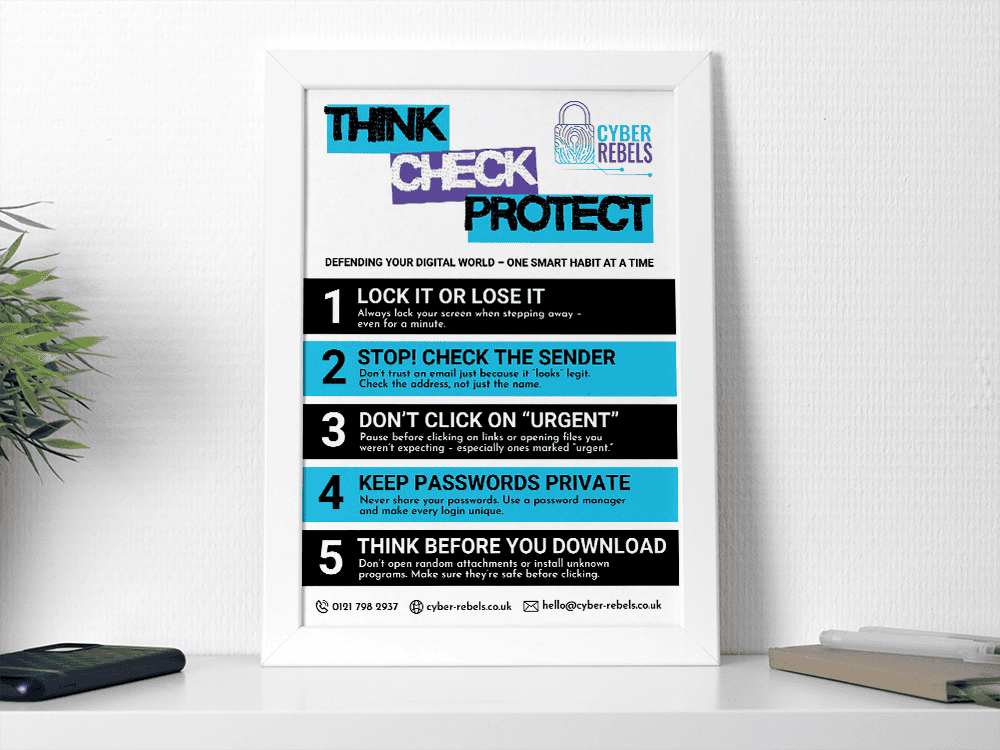
The Cyber Rebels Think Before You Click poster keeps five practical prompts visible around screen locking, sender checks, unexpected links and files, passwords and downloads. It is a prompt for everyday work, not a replacement for training, clear processes or usable controls.
What a poster can — and cannot — do
A poster can interrupt the flow just enough to make a familiar situation worth checking. It can reinforce language used during onboarding or training, give managers a simple way to start a conversation and remind staff that taking a moment to verify is a supported part of the job.
But visibility is not the same as capability. People still need to know which route to use, who to ask and what to do when a request turns out to be genuine. If checking a supplier means searching for an old contact number, if reporting feels like making a fuss, or if speed is rewarded more strongly than careful verification, the pressure that shaped the original decision is still there.
The better test is not whether a poster is on the wall. It is whether the person who pauses knows what to do next — and whether the organisation has made that action realistic.
What the poster keeps visible
The poster brings attention back to five ordinary decisions that can easily disappear into the working day:
- Lock your screen before stepping away, even briefly.
- Check the sender’s address rather than relying only on the display name.
- Pause before using unexpected urgent links or opening files you were not expecting.
- Keep passwords private and use unique passwords supported by a password manager.
- Check unexpected attachments, downloads and software before opening or installing them.
These are not rules for people to recite. They are cues for moments when the next action feels routine.
Their value comes from connecting each prompt to a usable route. That might mean navigating directly to a known service rather than following a message link, calling a supplier using contact details already held by the organisation, or asking a named colleague before opening an unexpected file.
How to use the poster without letting it fade into the wall
A poster left in the same place without explanation can gradually become part of the background. Placement matters, but context matters more.
Use it where the relevant decisions happen: near shared workspaces, staff areas, printers or screens rather than only in reception. Introduce it with a brief example from ordinary work so people understand why each prompt is there. Make the approved verification and reporting route visible alongside it, and return to the message during onboarding, team briefings, process changes or conversations following a near miss.
For remote and hybrid teams, the digital version can sit in an onboarding pack, staff intranet or internal resource area. It should still be accompanied by the same practical explanation: what should someone check, which route should they use and who can help when they are unsure?
Better decisions need support around the person
“Think before you click” is useful only when stopping does not create a different problem.
Managers need to make it clear that reasonable checking is supported. Teams need a simple way to verify an identity, report uncertainty and continue the task. Technical controls should reduce avoidable exposure rather than leave every decision to individual vigilance.
That does not make the poster pointless. It gives it a proper job. The poster creates a small opening for attention; the organisation supplies the route, authority and support that allow a better decision to happen.
A practical question to use with your team is:
If this poster makes someone pause, what exactly should they do next?
Any uncertainty in the answer is a useful place to improve the process.
Download the Think Before You Click poster
Subscribe to Cyber Rebels emails and we’ll send the printable A3 poster straight to your inbox.
Use it as a visible reminder alongside the clear checking routes and support your team needs when something does not feel quite right.