




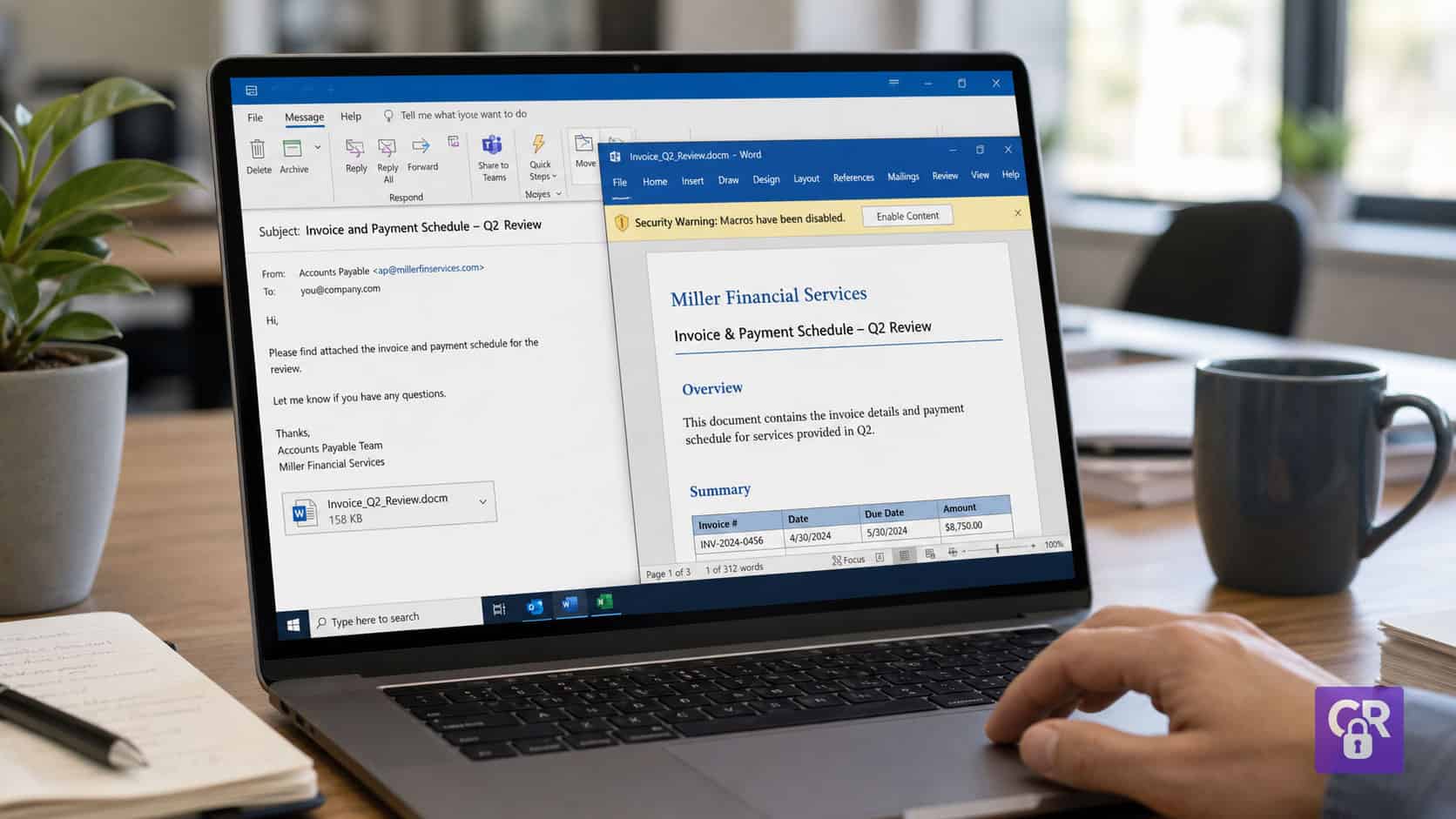
A file arrives while someone is already trying to finish something. It might be an invoice that needs checking before a payment run, a CV that needs reviewing before interviews are arranged, a supplier document that needs saving into a shared folder, or a spreadsheet that has to be opened before a meeting starts. The message around it feels normal. The file name matches the task. The timing makes sense. There is nothing dramatic about the moment, and because the person is already working, opening the file feels like the next ordinary step.
It might be an invoice that needs checking before a payment run, a CV that needs reviewing before interviews are arranged, a supplier document that needs saving into a shared folder, or a spreadsheet that has to be opened before a meeting starts. The message around it feels normal. The file name matches the task. The timing makes sense. There is nothing dramatic about the moment, and because the person is already working, opening the file feels like the next ordinary step.
That is one of the reasons malware is so often misunderstood. People tend to imagine it as something obvious. A screen locks. A warning flashes. A computer starts behaving strangely. A ransom note appears. Those things can happen, but they are usually the visible stage of a problem that began earlier, when everything still felt routine.
The first decision is rarely, “Should I let malware onto this device?” It is usually, “Do I open this so I can carry on?” or “Do I install this so the system works?” or “Do I enable this so the spreadsheet loads properly?” That decision often makes sense at the time because the action appears to support the work already in progress.
Understanding malware properly means looking beyond the technical label. Malware is malicious software, but the way it reaches people is often behavioural. It relies on familiar tasks, trusted routes, convenient shortcuts, and moments where stopping to check feels unnecessary. The danger is not always in how suspicious something looks. Often, it is in how naturally it fits.
What Malware Actually Is
Malware is software designed to do something harmful, unwanted, or unauthorised on a device, account, system, or network. It may steal information, encrypt files, record activity, monitor keystrokes, open a hidden route into a system, damage data, or allow someone else to control what happens next.
The word itself is useful because it covers more than one type of threat. Many people still use the word “virus” to describe almost anything harmful on a computer, but a virus is only one form of malware. Ransomware, spyware, trojans, worms, keyloggers, adware, rootkits, malicious scripts, and fileless malware all sit under the wider malware heading.
That difference matters because malware does not always behave in the way people expect. Some types are disruptive and obvious. Others are quiet and patient. Some need someone to open or install something. Others exploit weaknesses in software or use trusted tools already present on the device. Some show signs quickly, while others try to stay hidden for as long as possible.
This is why malware cannot be understood only as “bad software”. The software is only one part of the issue. The other part is the moment that allows it to run, spread, or gain access. In real life, that moment often sits inside ordinary work.
The Main Types of Malware
A virus is one of the best-known types of malware. It usually attaches itself to a file or program and spreads when that infected item is opened, copied, moved, or shared. The person using the device may believe they are handling a normal file, especially if the name, icon, or source looks familiar. The risk begins when the file is trusted enough to be opened or passed on.
A worm is different because it can spread more independently. It may move across systems or networks by exploiting weaknesses, rather than relying on someone manually opening each infected file. This is why outdated software and poorly protected systems can create wider problems. One weakness can become a route for movement.
A trojan pretends to be something legitimate. This is one of the most important types to understand because it fits closely with everyday decision-making. A person believes they are installing a useful tool, opening a genuine document, downloading an update, or running something needed for work. The malicious part is hidden behind something that appears acceptable. The decision feels reasonable because the visible purpose looks helpful.
Ransomware is malware that prevents access to files or systems, usually by encrypting data and then demanding payment or applying pressure in some other way. The impact can be severe because the organisation may suddenly lose access to the information and systems it needs to operate. In many ransomware incidents, the issue is not only that data has been locked. Attackers may also copy information and threaten to release it, which turns the incident into an operational, legal, financial, and reputational problem.
Spyware is designed to observe. It may monitor activity, collect information, track browsing, access messages, or gather sensitive data in the background. Spyware is not always obvious because it often works best when the person using the device does not know it is there. The device may continue to function normally enough for the person to carry on.
A keylogger records what someone types. That can include passwords, payment details, customer information, internal messages, search terms, and anything else entered through the keyboard. Like spyware, it may not create an obvious interruption. The harm comes from what is quietly captured.
Adware is sometimes treated as less serious, but it still matters. It can display unwanted adverts, redirect searches, track behaviour, change browser settings, or push people towards further risky pages and downloads. Even when it is not as destructive as ransomware, it can still weaken trust in the device and create more exposure.
A rootkit is designed to hide deeply in a system and maintain access while avoiding detection. Rootkits can be difficult to identify because concealment is part of their purpose. They are not designed to announce themselves. They are designed to stay.
Fileless malware is different again because it may not rely on a traditional malicious file sitting visibly on the device. It can use memory, scripts, or legitimate system tools in harmful ways. This matters because many people still imagine malware as a file that can simply be found and removed. Some attacks do not work that neatly.
These categories are useful, but they are not the whole story. For most people, the more important question is not whether they can name every type of malware. It is whether they can recognise the kind of moment where malware is being made to look normal enough to trust.
How Malware Gets Onto a Computer
Malware often enters through the same routes people already use to work, communicate, download, update, and share information. That is what makes it difficult. It does not always arrive through something that feels separate from the working day. It arrives through the working day itself.
Email attachments are a common route. A file may appear to be an invoice, delivery note, CV, purchase order, payslip, report, form, or document request. If someone’s role involves handling those kinds of files, opening the attachment does not feel unusual. A finance assistant processing invoices, a manager reviewing job applications, or a small business owner checking supplier paperwork may all see the file as part of the task rather than as a security decision.
Links work in a similar way. A message may ask someone to view a shared document, sign into a portal, collect a voicemail, approve a change, check a payment issue, or download a file. The link may appear in an email, text message, chat platform, social media message, or shared workspace. What makes it convincing is not always technical sophistication. Sometimes it is simply timing. If the message arrives while the task is already active, it feels more believable.
Downloads are another common route. Someone searches for a free tool, a PDF converter, a browser extension, a media player, a driver, a template, or software that solves a small immediate problem. They are not trying to take a risk. They are trying to get something done. The download appears to remove friction, so the decision to install it feels practical.
Fake updates rely on familiarity. People are used to software needing updates, and they know updates matter. So when a prompt appears saying that a browser, plugin, player, or application needs attention, clicking it can feel like responsible behaviour. The problem is that not every update prompt is genuine, especially when it appears through a random web page, advert, or unexpected pop-up rather than through the software’s proper update process.
Shared cloud files create a different kind of trust problem. If a document arrives through a familiar platform, the platform itself can make the file feel safer. People trust the route, so they may trust the content more quickly. But a genuine platform does not automatically make every shared file safe, especially if an account has been compromised or a malicious file has been uploaded.
Remote access tools can also be misused. In fake support situations, someone may be persuaded to install software that allows another person to access their device. The decision can feel sensible because the person believes they are receiving help. If the device is already behaving strangely, or the caller sounds confident, helpful, or authoritative, allowing access may feel like the fastest route to fixing the problem.
Malware can also enter through USB devices, compromised websites, unofficial software, malicious adverts, and unpatched systems. In some cases, the person makes a visible decision, such as opening, installing, enabling, or allowing. In other cases, a technical weakness is exploited in the background. But across many malware incidents, the same pattern appears. The route in feels normal because it is attached to something people already do.
The action feels reasonable because it fits the task. The person is not choosing danger. They are choosing progress.
Why Hidden File Extensions Matter
Hidden file extensions deserve a proper place in any practical malware discussion because they show how easily a useful clue can disappear from the decision moment.
On Windows devices, file extensions can be hidden for known file types. That means a file may appear to have one identity on screen while its full name tells a more important story. A file might appear to be called Invoice-April.pdf, but the full file name could actually be Invoice-April.pdf.exe.
That difference matters. A PDF is a document. An .exe file is a program. If file extensions are hidden, the person may only notice the familiar part of the name. They see “invoice” and “PDF”. They may also see an icon that looks convincing. If the file arrives during a normal finance task, opening it feels like work.
The same idea can appear in file names such as DeliveryNote.pdf.exe, CV.docx.scr, Statement.xlsx.js, or Photo.jpg.exe. The familiar part of the name tells one story, while the actual file type tells another. If the full extension is not visible, the person is being asked to make a decision with less information than they need.
This is not a small point. It shows why cybersecurity is not just about telling people to be careful. Many people already know they should be careful with suspicious files. The problem is that a disguised file may not look suspicious at the point where they need to decide. One of the clues that could help them has been hidden.
Turning on file extensions does not stop malware by itself. It does not replace antivirus, updates, access controls, backups, or safe reporting routes. But it gives people more visibility before they act. That visibility can change the decision. A supposed invoice that is clearly shown as a program no longer feels like a normal document. A CV with an unexpected script extension no longer feels like a standard application attachment. The moment becomes easier to question.
That small pause matters because malware often depends on the action being treated as routine.
Why Antivirus Does Not Always Catch Malware
Antivirus and endpoint protection are important. They should be used, updated, and taken seriously. The problem is expecting them to remove the need for judgement. Security tools are part of the defence, but they are not a guarantee that every harmful action will be stopped before anything happens.
Some malware is new or has been changed enough that it does not match what security tools have already seen. Attackers can alter files, names, code, packaging, delivery methods, and behaviour to make detection harder. A file may not be flagged immediately because, at that moment, it does not look enough like a known threat.
Some malware behaves quietly at first. It may wait before acting, check where it is running, avoid certain behaviours, or only activate when specific conditions are met. That can make it harder to detect at the point of download or opening. The fact that nothing obvious happens straight away does not always mean nothing happened.
Some attacks use legitimate tools in harmful ways. A trusted system tool may be used to run a script, make a connection, or carry out an action that looks normal in one context and suspicious in another. This is where simple ideas of “good file” and “bad file” become less useful. The same tool can be legitimate in one situation and misused in another.
Some malware relies on the user granting permission. If someone chooses to install software, enable macros, allow remote access, approve a warning, or run a file, the system may treat that action differently from something clearly unauthorised. From the device’s point of view, the user has allowed the action. From the person’s point of view, they may simply have been trying to finish a task.
This is where the gap appears. Antivirus can inspect files, processes, behaviours, and known patterns, but it cannot always understand the human context. It does not know whether that invoice was expected, whether the supplier normally sends documents that way, whether the person was under pressure to finish before a deadline, or whether the update prompt appeared during a task where it felt normal.
That does not make antivirus pointless. It makes it incomplete on its own. Malware often tries to reach the point where a human decision gives it permission to continue. If that decision is shaped by urgency, familiarity, convenience, or trust, the technical control may not always be enough.
Why Enabling Content Can Be a Malware Moment
One of the most common malware moments is not opening a file. It is what happens after the file opens.
A spreadsheet may display a banner saying macros have been disabled. A document may say content needs to be enabled. A file may show a message claiming that the content is protected, hidden, encrypted, or only viewable after clicking a button. The person is already inside the document, so the request feels like part of opening it properly.
This is where the decision becomes more subtle. The person may not think they are running code. They may think they are allowing the document to display correctly. If they have used complex spreadsheets before, macros may not feel unusual. If the document looks like it came from a colleague, supplier, or familiar process, enabling content can feel like the expected step.
The decision makes sense because the prompt creates a practical problem. The document appears incomplete, and the button appears to solve it. Under time pressure, the fastest route is to click and continue.
The risk is that macros and active content can be used to run instructions. In legitimate files, they may automate useful tasks. In malicious files, they may help malware run, download further payloads, or change the system. The difficulty is that the same feature can be useful in one context and dangerous in another.
That is why the question should not be, “Are macros always bad?” The better question is, “Was I expecting a file that genuinely needs this level of permission, and have I verified that through a trusted route?” If the answer is unclear, the moment deserves a pause.
Why Malware Decisions Feel Reasonable
The phrase “don’t click suspicious links” sounds simple until the link does not look suspicious. The same applies to files, prompts, downloads, and updates. The difficulty is not always that people fail to recognise danger. It is that the danger has been wrapped in something that feels normal.
A spreadsheet asks for macros to be enabled before the figures will display properly. That feels believable if the person has used complex spreadsheets before. They may not think of macros as code. They may think of them as the thing that makes the spreadsheet work.
A fake update appears while someone is using a website or tool. That feels normal because updates are part of using technology. People have been told for years that updates matter, so clicking an update prompt can feel like responsible behaviour.
A supplier sends a revised invoice during a busy payment run. The timing fits the work. A finance team may already be expecting invoices, queries, changes, and follow-ups. Opening the document feels like processing the workload, not stepping into a cyber incident.
A CV arrives during recruitment. Opening CVs is part of recruitment. If the person reviewing applications is moving quickly between candidates, the attachment fits the process. The action is familiar enough to pass without much thought.
A browser extension promises to save time. The person is busy, and the tool appears to reduce friction. Convenience is powerful because it presents itself as help. The risk sits behind the promise of making the task easier.
A support caller asks someone to install remote access software. If the device already has an issue, help feels welcome. The person may not think, “I am giving a stranger access to my machine.” They may think, “Someone is helping me fix this problem.”
None of these moments begins with a person deciding to ignore security. They begin with a person trying to complete work. That is why malware succeeds. It does not always need to defeat knowledge. It only needs to appear when speed, trust, routine, or convenience makes the next action feel obvious.
The decision to continue is often logical. That is what makes it dangerous.
What People Should Notice Before Acting
The answer is not to make people afraid of every file, link, prompt, or download. That would not help. It would slow work down, create frustration, and eventually train people to ignore security advice because it does not fit reality. People need to work. They need to open documents, use systems, download legitimate tools, update software, and respond to requests.
A better approach is to notice when something is asking for extra trust.
There is a difference between opening a document and running a program. There is a difference between viewing a spreadsheet and enabling active content. There is a difference between reading a message and entering credentials through a link. There is a difference between speaking to support and giving remote access to a device. There is a difference between updating software through its normal route and clicking a random prompt on a web page.
The decision point usually appears when the action gives something more permission, more access, or more control. That is the moment to slow down. It does not require panic. It requires interpretation.
A person can ask whether the file type matches what the file claims to be, whether the full extension is visible, whether the file was expected, whether it arrived through the usual route, whether the sender can be checked separately, whether the software comes from the official source, whether the prompt appeared in the right place, and whether there is a safer way to reach the same destination without following the link or pop-up.
These questions do not need to become a long formal checklist every time. In real work, that would not last. The aim is to create a small interruption in the right place. Not every task needs suspicion, but some tasks need verification.
That distinction matters. Suspicion makes people feel like security is against the work. Verification makes security part of doing the work properly.
What To Do If You Think Malware Is On Your Device
If something feels wrong after opening a file, installing software, clicking a link, or allowing access, the first instinct is often to keep trying things. People may click around, restart the device, search for fixes, enter passwords again, or try to remove whatever they think caused the problem. That reaction makes sense because they are trying to regain control, but it can make the situation harder to understand.
In an organisation, the most useful action is usually to report it quickly through the proper route. That may be IT, a manager, a managed service provider, or whoever handles security incidents. Early reporting matters because malware can move from one device or account into a wider environment. Reporting something that turns out to be harmless is far better than waiting until the problem is obvious.
If the device appears seriously affected, disconnecting it from the internet or network may help limit further communication while support is arranged. It is also sensible to avoid entering more passwords on the affected device. If credentials may have been exposed, important passwords should be changed from a separate trusted device.
It is also worth preserving details. The message, file name, website address, time, screenshot, sender, and sequence of actions can all help someone understand what happened. Deleting everything too quickly may remove useful evidence. The aim is not to investigate alone. The aim is to stop making decisions under pressure without the right support.
Malware creates urgency. A good response creates space.
Why Malware Awareness Needs To Become Judgement
It is useful to know what malware is. It is useful to understand the difference between viruses, trojans, ransomware, spyware, worms, keyloggers, rootkits, adware, and fileless attacks. It is useful to know that antivirus does not catch everything and that hidden file extensions can make dangerous files look safer than they are.
But knowledge alone is not the full answer. The real shift happens when people can recognise the moment where malware is trying to blend into normal work. That moment might be a file that looks like an invoice, a spreadsheet asking for macros, a download that solves an immediate problem, a fake update that appears during a task, a browser extension that promises convenience, a shared document from a familiar platform, or a file name where the visible label and the real extension do not match.
In each case, the person is not choosing danger. They are choosing progress. That is why malware is not only a technical issue. It is a decision-making issue. It sits inside ordinary work, uses familiar actions, and relies on people doing what usually helps them get the job done.
This is where awareness needs to become judgement. A team does not need to treat every file, prompt, or download as suspicious. That would make work harder and quickly become unrealistic. What they need is the ability to recognise when a routine action is asking for more trust than usual, and to know what a proportionate pause looks like before they continue.
That might mean checking the full file extension before opening an attachment, using the official route for an update instead of clicking a pop-up, verifying whether a spreadsheet really needs macros, or asking for confirmation before installing remote access software. None of those actions need to stop work. They simply change the decision at the point where malware is hoping the action will remain automatic.
For organisations, this is the part worth paying attention to. Malware risk does not only sit in devices, tools, or antivirus settings. It also sits in repeated moments where people are busy, familiar actions feel safe, and small prompts are allowed to pass without question. Those moments do not usually stand out on their own, but they repeat across teams, systems, and working days.
When people learn to recognise those moments earlier, the behaviour changes. The file is checked before it is opened. The update is verified before it is installed. The macro prompt is questioned before it is enabled. The support request is confirmed before access is granted. The work still moves forward, but it moves with clearer judgement.
That is the bridge between malware awareness and practical cyber resilience. Not fear. Not blame. Not expecting people to become technical specialists overnight. Just helping them recognise the real decision points that already exist in their work, and giving them the confidence to handle those moments properly.
If this feels familiar in your organisation, it may be worth looking at how your team currently handles these everyday decisions. Cyber Rebels’ behaviour-led cybersecurity training is designed around those real moments, helping people build the judgement to recognise risk before the click, not only after something has gone wrong.

Director of Training and Development, Cyber Rebels.
Andy Longhurst is the founder of Cyber Rebels and a cybersecurity practitioner and educator focused on how risk actually shows up in real organisations. His work sits at the intersection of digital safety, education, and practical risk management — helping teams understand not just what policies say, but what happens in the moments where decisions are made under pressure.
With a background spanning adult education, web development, and technical consultancy, Andy specialises in translating complex security concepts into clear, usable understanding. Rather than focusing solely on tools or compliance frameworks, his approach centres on human behaviour, judgement, and the systems that shape everyday choices.
He delivers live, interactive cyber awareness training for organisations of all sizes, from small businesses and education providers to public-sector teams and larger organisations operating in complex risk environments.
Outside of delivery, Andy spends his time analysing emerging attack patterns, refining training design, and exploring how organisations can build resilience that holds up in the real world — usually with a strategically sized cup of tea close to hand.